Aug 02, 2026
August 02, 2026
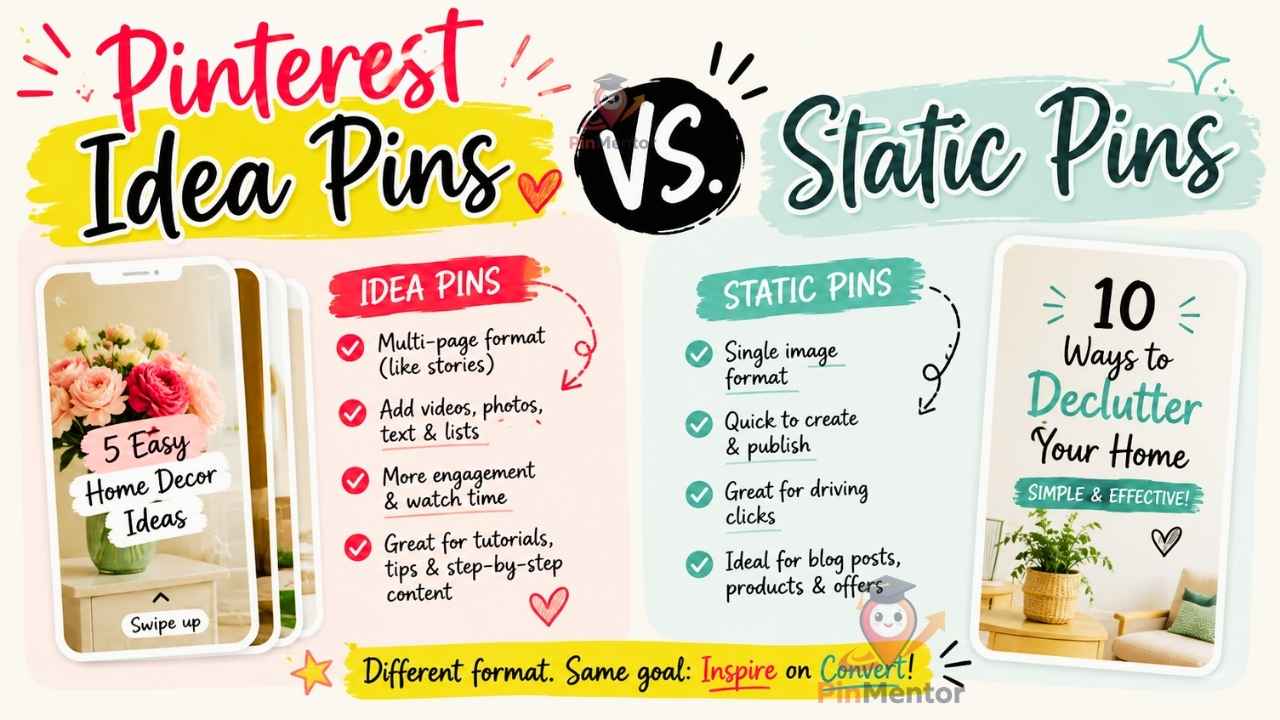
If you've spent any time in Pinterest creator forums, you've probably seen the advice: "Idea Pins get way more reach, so post those instead of static pins." It's not wrong, exactly — but it's incomplete, and following it blindly can quietly tank the metric most bloggers and store owners actually care about: outbound clicks to your website.
This guide breaks down the real differences between Idea Pins and static pins, what each format is actually built for, and how to decide which one deserves your time, based on your specific goal.
Static pins are the classic Pinterest format: a single vertical image (or a simple multi-image carousel) with a title, description, and — critically — a clickable link that sends the viewer straight to your website, blog post, or product page.
Idea Pins are Pinterest's native, multi-page format, similar in spirit to Instagram Stories or TikTok slides. They can include multiple pages of images, video, text overlays, and stickers, all played within Pinterest itself. Idea Pins are designed to keep users on Pinterest, not send them elsewhere.
That last distinction is the entire ballgame. Static pins are built to route traffic out. Idea Pins are built to keep engagement in.
Pinterest's algorithm has, at various points, favored Idea Pins in distribution — showing them to more users, more often, especially to new or growing accounts. If your only metric is impressions or reach, Idea Pins will often outperform static pins for the same amount of effort.
This is where the "just post Idea Pins" advice comes from, and it's genuinely true if your goal is:
Growing followers
Building topical authority within Pinterest itself
Getting your brand or face in front of more people
Warming up a brand-new account with little search history
Here's what the "just post Idea Pins" crowd often leaves out: Idea Pins don't include a clickable outbound link in the same prominent way static pins do. Some formats allow a link, but it's less central to the format, and user behavior on Idea Pins skews toward swiping through content in-app rather than clicking away.
If your actual business goal is:
Blog ad revenue (which depends on pageviews)
Affiliate link clicks
E-commerce store visits
Email list sign-ups from a landing page
...then a static pin that clearly promises a destination ("25 Budget Meal Prep Recipes — Full List Inside") and delivers a direct, one-click path to your site will typically out-convert an Idea Pin, even with lower raw impressions.
This is the core trade-off: Idea Pins optimize for reach within Pinterest. Static pins optimize for traffic leaving Pinterest. Most creators only need one of these, not both, and the mismatch between goal and format is one of the most common reasons Pinterest traffic strategies quietly underperform.
If your primary goal is website traffic (bloggers, affiliates, e-commerce): Static pins should be the majority of your output — most successful bloggers and store owners run 70–90% static pins, with Idea Pins used occasionally to boost overall account visibility and support discovery of newer boards or topics.
If your primary goal is brand awareness or in-app following: Lean into Idea Pins as the majority format, since the objective (keeping people engaged with your content on Pinterest) aligns directly with what the format is built for.
If you're a brand-new account with no search history: Start with a mix, leaning slightly more toward Idea Pins for the first few weeks. This can help Pinterest understand your niche and start surfacing your content faster, before shifting the ratio back toward static pins once your account has some traction.
It's worth understanding why the reach gap exists. Pinterest's ranking systems weigh multiple signals: relevance to search queries, historical engagement on similar content, freshness, and — for Idea Pins specifically — completion and interaction signals like taps-through-pages, since those indicate the content held attention within the app.
Static pins, by contrast, are evaluated heavily on save rate and click-through rate relative to impressions. A static pin with a high save rate but middling clicks might still rank well in search, since saves are one of Pinterest's strongest long-term relevance signals — but if your goal is traffic specifically, clicks matter more than saves for your bottom line, even if they matter less to the algorithm's internal ranking.
This means the "best" pin by Pinterest's own ranking criteria and the "best" pin for your business goal aren't always the same pin. Understanding that distinction is what separates strategies that look good in analytics from strategies that actually grow revenue.
Some content genuinely performs better as an Idea Pin, regardless of your traffic goals:
Step-by-step tutorials where showing sequential progress (before/during/after) matters more than sending someone to read a full article
Behind-the-scenes or process content that builds brand trust but doesn't have a natural single destination URL
Product demonstrations where seeing an item from multiple angles or in use adds more value than a static product photo
Seasonal or trend-based content meant to build visibility quickly, where the destination matters less than the immediate engagement
List-style blog posts ("15 Ideas for X") where the payoff is the full list, which lives on your site
Recipes where the full ingredient list and instructions are the actual value, not just the visual
Product pages where the goal is a direct purchase or store visit
Any content monetized by ad revenue, since ad revenue depends entirely on people leaving Pinterest and landing on your page
Rather than treating this as an either/or decision, most successful accounts run both formats with intention:
Publish the static pin first, driving traffic to the core content (blog post, product page).
Follow up with an Idea Pin 1–2 weeks later on the same general topic — not a duplicate, but a related angle (a behind-the-scenes look, a quick tips summary, or a visual walkthrough) that builds broader account visibility and can indirectly support the static pin's performance through improved topical relevance signals.
Track both separately. Idea Pin performance and static pin performance answer different questions — don't judge one by the other's metrics.
Switching entirely to Idea Pins because "that's what's working now." Reach isn't revenue. If your business model depends on off-platform traffic, an all-Idea-Pin strategy can quietly starve your website of visitors even while your Pinterest account looks like it's growing.
Ignoring Idea Pins completely. Even traffic-focused accounts benefit from occasional Idea Pins to support overall account visibility and reach new audience segments who might later engage with your static pins too.
Using Idea Pins as a dumping ground for content with no real hook. Because the format rewards swipe-through completion, weak or repetitive Idea Pins can hurt your account's broader engagement signals, not just that single pin's performance.
Forgetting to check the destination link setup. On formats where an outbound link is available within an Idea Pin, many creators simply forget to add it, missing out on any traffic potential the format did offer.
Do Idea Pins expire faster than static pins? No — like static pins, Idea Pins can continue generating impressions well beyond their initial publish window, particularly if they perform well early and Pinterest's algorithm continues to distribute them in search and recommendations.
Can Idea Pins include a link to my website? Some Idea Pin formats support an outbound link or product tag, but it's less prominent than the primary click target on a static pin, and it isn't guaranteed to be available for all account types. Always check your current format's options before assuming a click-through path exists.
Should a brand-new Pinterest account start with Idea Pins or static pins? A mix works best, with a slight lean toward Idea Pins in the first few weeks to help the algorithm understand your niche faster, before shifting the balance toward static pins once you have some account history and your traffic goals become the priority.
How many Idea Pins vs. static pins should I post per week? There's no universal ratio, but a common, sustainable starting point for traffic-focused accounts is roughly 80% static pins to 20% Idea Pins, adjusted based on what your own analytics show once you have a few months of data.
Because Idea Pins and static pins are built for different outcomes, judging them by the same metrics will give you a misleading picture. Here's what to actually track:
For static pins: outbound clicks, click-through rate relative to impressions, and — if you have Google Analytics connected — actual pageviews and conversions arriving from Pinterest referral traffic. Save rate matters too, since it influences long-term ranking, but clicks are the metric tied directly to revenue.
For Idea Pins: average watch time or page completion rate, follower growth attributable to the pin, and overall reach or impressions. If a link is included, track its clicks separately, but don't expect them to rival a static pin's click-through rate — that's not what the format is optimized for.
Reviewing these side by side monthly, rather than lumping "pin performance" into one blended number, is what makes the format decision data-driven instead of a guess.
Idea Pins and static pins aren't competing formats — they're tools built for different jobs. Idea Pins are Pinterest's answer to keeping users engaged inside the platform; static pins are the format built to send people out to your website. Confusing "more reach" with "more traffic" is the single most common strategic mistake creators make when choosing between them.
Start by getting clear on your actual goal — traffic and revenue, or in-app visibility and following — and let that decision drive your format mix, not whichever one happens to be trending in your feed this month.
Planning both formats manually eats hours every week. PinMentor helps you organize your content calendar around what each pin is actually meant to achieve, so your static pins and Idea Pins work together instead of competing for your time. Start your free 30-day trial →

PinMentor helps you analyze, optimize, and scale your Pinterest strategy with powerful analytics and insights.


@ PinMentor LLC. All Rights Reserved